LiDAR Construction Measurement: Accuracy, Limits and Uses
Phone LiDAR can measure a room in minutes. Here is what published tests say about its accuracy, what makes it better or worse, and where it belongs on a construction site.
Published
20 OCT 2026
Reading Time
9 min read
Author
Aman Solanki
Category
Tech Engineering
Aman Solanki leads Business and Client Relations at Shivlam, a spatial computing and product studio in Ahmedabad, India.
Phone LiDAR can measure a room in minutes. Here is what published tests say about its accuracy, what makes it better or worse, and where it belongs on a construction site.
In short
Phone and tablet LiDAR measures rooms, openings and building elements in minutes. In published tests it reached about ±1 cm on small objects at close range, but errors grew to around 10 cm over larger areas. It suits as-built checks, room capture and quick quantities. It does not replace a total station or laser scanner for survey-grade work.
Since 2020, LiDAR has come built into iPhone Pro and iPad Pro devices. For construction teams, that changed something simple: the device already in your pocket can now capture a room in 3D. The real question on site is not whether it can scan, but whether you can trust the numbers it gives you.
This guide covers what phone LiDAR is, what independent tests have found about its accuracy, what makes results better or worse, and where it fits next to the tools you already use.
In this post
What phone LiDAR isHow accurate is it?What affects accuracyAccuracy vs toleranceWhere it worksWhere it doesn’tLiDAR vs scanner vs total stationNumbers you can trustQuestionsWhat phone LiDAR is
LiDAR stands for Light Detection and Ranging. The sensor sends out pulses of infrared light and times how long they take to bounce back. From those timings, the device works out distances and builds a point cloud: thousands of measured points that together describe the surfaces around you.

Apple added LiDAR to the iPad Pro in March 2020 and to the iPhone 12 Pro in October 2020, and has kept it in its Pro models since. A study in Scientific Reports found the sensor performs the same on iPad and iPhone, with a maximum range of up to 5 m.
Range matters more than it sounds. The same study measured how dense the point cloud gets at different distances: about 7,225 points per square metre at 25 cm, falling to about 150 points per square metre at 2.5 m. Scan from close up and the device sees far more detail.
Phone LiDAR is not the same as a terrestrial laser scanner. A scanner on a tripod measures from a fixed, levelled position with a much longer range. A phone measures while you walk, and has to work out where it is as it moves. That difference explains most of what follows.
How accurate is it? What the tests show
Independent researchers have tested Apple’s LiDAR against reference methods. The results depend heavily on what is being measured and how.
| Study | Setting | Compared against | What they found |
|---|---|---|---|
| Luetzenburg, Kroon and Bjørk, Scientific Reports, 2021 | Boxes with sharp edges; a coastal cliff 130 × 15 × 10 m | Measuring stick; photogrammetry point cloud | About ±1 cm on objects with sides over 10 cm. About ±10 cm across the full cliff |
| Treccani, Adami and Fregonese, ISPRS Archives, 2024 | A university corridor (indoor) and a narrow street (outdoor), five iOS apps | Terrestrial laser scanner | Errors around 1 cm in some areas and around 10 cm in others. Apps that corrected drift with loop closure did better |
Two earlier studies, summarised in the 2024 paper, point the same way: Apple’s LiDAR gave better accuracy on smaller areas, and produced point clouds good enough for BIM only in certain conditions.
The pattern is consistent. On small, well-defined objects at close range, phone LiDAR gets close to a centimetre. Over long walls, whole floors and outdoor areas, errors of several centimetres up to 10 cm are normal.
What makes accuracy better or worse
Most of the difference between a 1 cm result and a 10 cm result comes down to a handful of factors.
Distance. Point density drops sharply as you move away. Beyond a couple of metres the sensor sees far less, and edges get vague.
Movement and drift. The device estimates its own position as you walk. Small errors add up over a long path, so the far end of a long wall can end up in the wrong place. The 2024 study found that apps which close the loop (returning to the starting point so the error can be corrected) gave clearly better results.
Object size. The 2021 study reported its ±1 cm result for objects with sides over 10 cm; smaller objects are harder to capture. Small details like sockets, thin trims and narrow gaps are hard to measure well.
Surfaces. Glass, mirrors, shiny metal and very dark surfaces return light badly or not at all. Plain concrete, plaster and painted walls behave much better.
Light and conditions. Strong sunlight can affect the sensor, and outdoor scans are usually less accurate than indoor ones.
The app. The raw data is processed differently by each app. In the 2024 study, how the app handled the data had a large effect on the final result. Two apps on the same phone can give different numbers.
Edges and corners. Point clouds tend to round off sharp edges, so corners and openings can measure slightly smaller or softer than they are.
Accuracy is not the same as tolerance
These two words get mixed up on site, and the mix-up causes arguments.
Measurement accuracy is how close your measured number is to the true value. It belongs to the tool and the method.
Construction tolerance is how far a built element is allowed to differ from the design. It belongs to the specification or standard for the project.
To judge whether a wall is within tolerance, your measurement has to be much more accurate than the tolerance itself. If a wall is allowed to be 2 cm out and your measurement can be 5 cm out, the measurement cannot tell you whether the wall passes. It can only tell you something might be wrong.
That is why the right question is never just “how accurate is LiDAR?” It is “is it accurate enough for this check?”
Where phone LiDAR works on site
Used within its limits, phone LiDAR saves real time. It is a good fit for:
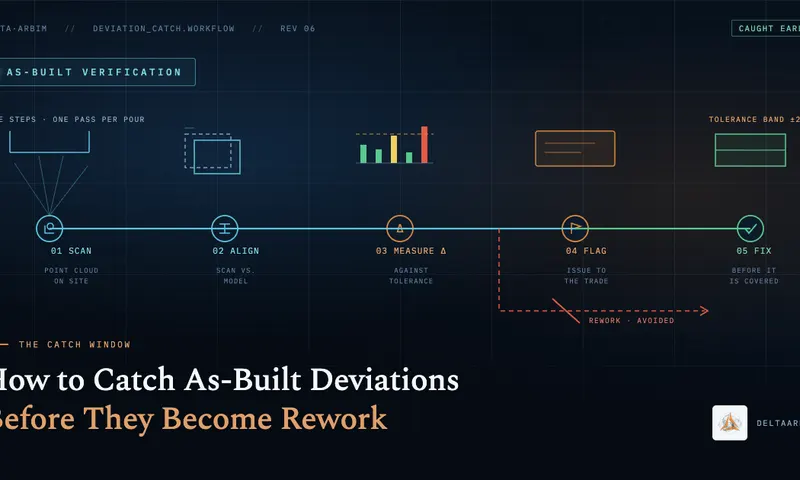
- As-built checks of rooms and openings. Walk a floor and capture what was built, then compare it with the drawings or model. (We wrote about catching as-built deviations before rework.)
- Renovation and refurbishment pre-surveys. Get a quick picture of an existing space before anyone draws a line.
- Room capture for floor plans. Turn a scan into a floor plan for early planning, fit-out or facilities records.
- Progress records. A scan with photos is a stronger record than photos alone.
- Quick quantity estimates. Approximate wall areas, floor areas and volumes for early estimating.
- Placing models on site. AR apps use the same sensor to fit a BIM model to the real building.
Where it doesn’t
Phone LiDAR is the wrong tool when:
- The job needs survey-grade accuracy. Setting out, control surveys and legal or contractual surveys belong to a total station, a laser scanner and a qualified surveyor.
- Long distances and large areas have no reference points. Drift builds up over long walls and whole floors.
- The element is hidden. LiDAR measures surfaces. It cannot see wall thickness from one side, rebar inside concrete, or services behind a finish. Those values have to come from drawings or other checks.
- Details are very small. The best published results apply to objects over about 10 cm.
- The number goes straight into billing. A quantity used for payment needs a reference check and an agreed method, not a single unchecked scan.
Phone LiDAR vs laser scanner vs total station
Each tool has its place. A simple way to choose:
| Phone or tablet LiDAR | Terrestrial laser scanner | Total station | |
|---|---|---|---|
| Accuracy (typical) | Around 1 cm at close range on small objects; up to around 10 cm over larger areas (studies above) | Much higher; survey-grade | Survey-grade, for individual points |
| Speed | Minutes per room | Longer setup; fast capture per station | Point by point |
| Cost | Device you may already own | High | High |
| Skill needed | Low to medium | Trained operator | Trained surveyor |
| Best for | Quick checks, room capture, early estimates | Detailed as-built models, large or complex areas | Setting out, control, precise points |
The tools also work together. A few total station points or laser-measured reference distances can anchor a phone scan and catch drift.
How to get numbers you can trust
If you use phone LiDAR for anything that matters, build a simple routine:
- 01Scan close. Stay within one to two metres of the surfaces you care about.
- 02Move slowly and overlap. Give the device time to track its position.
- 03Close the loop. Finish where you started so the app can correct drift.
- 04Check one known dimension. Measure a door width or wall length with a laser distance meter or tape and compare it with the scan.
- 05Repeat the scan. Two scans that agree are worth more than one.
- 06Record the conditions. Note the device, the app, the distance, the surface and the light. A number without its conditions cannot be checked later.
- 07Flag weak scans. If a scan looks patchy or doesn’t match the check dimension, don’t use it. Rescan.
How we use LiDAR at Shivlam
We build construction software around these limits rather than pretending they don’t exist.
DeltaARBIM puts the BIM model on the real site on an iPhone or iPad, with no markers and no internet, so teams can see wrong openings and misplaced elements before they are closed up. DeltaTapeless, our phone measurement app, is in development and is being built with these accuracy checks in mind.
We also build custom LiDAR and AR tools for construction companies and software teams. We recommend starting every LiDAR project with an accuracy test on your own elements, before anyone relies on the numbers. See our 3D reconstruction services for scan-based work.
Building a measuring or scanning app for construction?
Talk to our engineers about what phone LiDAR can and can’t do for your use case.
Talk to our engineersSources
Luetzenburg, G., Kroon, A. and Bjørk, A. A. (2021). Evaluation of the Apple iPhone 12 Pro LiDAR for an application in geosciences. Scientific Reports, 11, 22221. nature.com/articles/s41598-021-01763-9
Treccani, D., Adami, A. and Fregonese, L. (2024). Assessing the effectiveness of LiDAR-based apps on Apple devices to survey indoor and outdoor medium sized areas. ISPRS Archives, XLVIII-2/W8-2024, 431. isprs-archives.copernicus.org/articles/XLVIII-2-W8-2024/431/2024/
FAQ
Questions readers ask about this topic.
Is iPhone LiDAR accurate enough for construction measurement?
For quick checks, room capture and early estimates, yes. In published tests it reached about ±1 cm on small objects at close range, with errors up to around 10 cm over larger areas. For setting out, survey-grade work or quantities used for payment, use a total station or laser scanner, or check the scan against reference measurements.
What is the range of iPhone LiDAR?
Up to about 5 metres, according to a 2021 study in Scientific Reports. Point density falls quickly with distance, so results are best within one to two metres of the surface.
Can phone LiDAR replace a laser scanner?
Not for survey-grade work. A terrestrial laser scanner measures from fixed, levelled positions and is far more accurate over large areas. Phone LiDAR is faster and cheaper, and works well for quick checks and small spaces.
Which iPhones and iPads have LiDAR?
Apple’s Pro models: the iPad Pro since 2020 and the iPhone 12 Pro and later Pro and Pro Max models. Standard iPhone models do not have the sensor.